

Check AroFlo lead enquiries and send failed ones again
Every submission is saved in Formpiece before anything is sent to AroFlo, so an enquiry that AroFlo refuses is still here to read and send again. Enquiries under AroFlo Leads lists the whole account's enquiries, newest first. A form's own Enquiries tab lists only that form's.
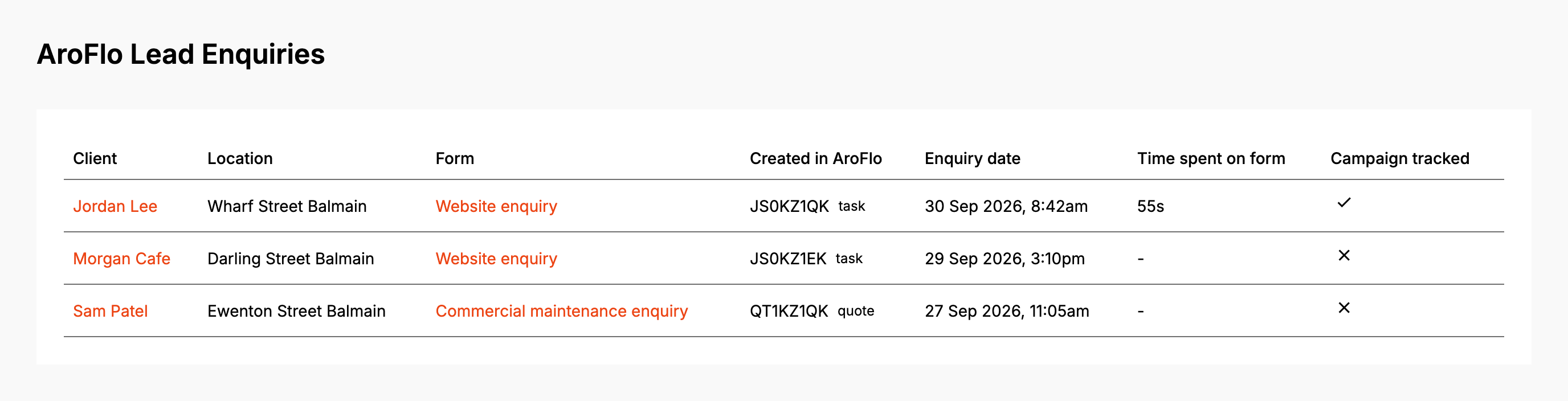
Created in AroFlo says what happened to each one:
- The AroFlo ID with "task" or "quote" beside it: AroFlo created it.
- Not sent, with a warning icon: it never reached AroFlo. Hover over it for the reason.
- Waiting: it hasn't been sent yet, or a resend is on its way.
The list shows 50 enquiries at a time. Click Load more enquiries for the next 50.
Before you start
Time spent on form, Campaign tracked and the enquiry's UTM Parameters need a lead form subscription. Without one they read "Subscription required".
Step by step
-
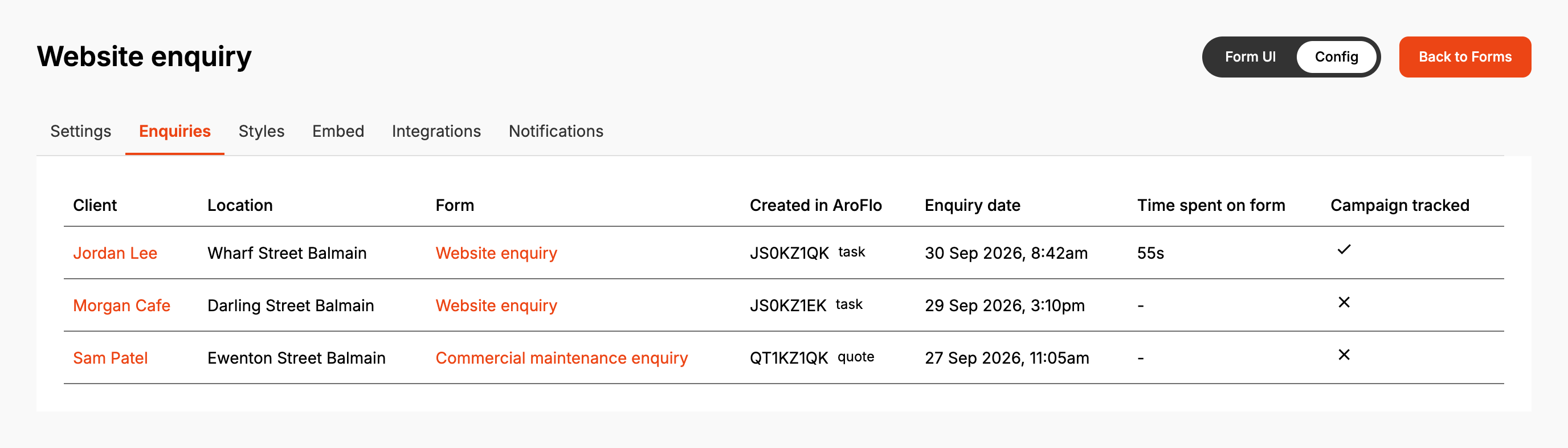
Open AroFlo Leads, then Enquiries. For one form, open the form from Forms and click its Enquiries tab instead.
-
Click the client's name to open the enquiry.
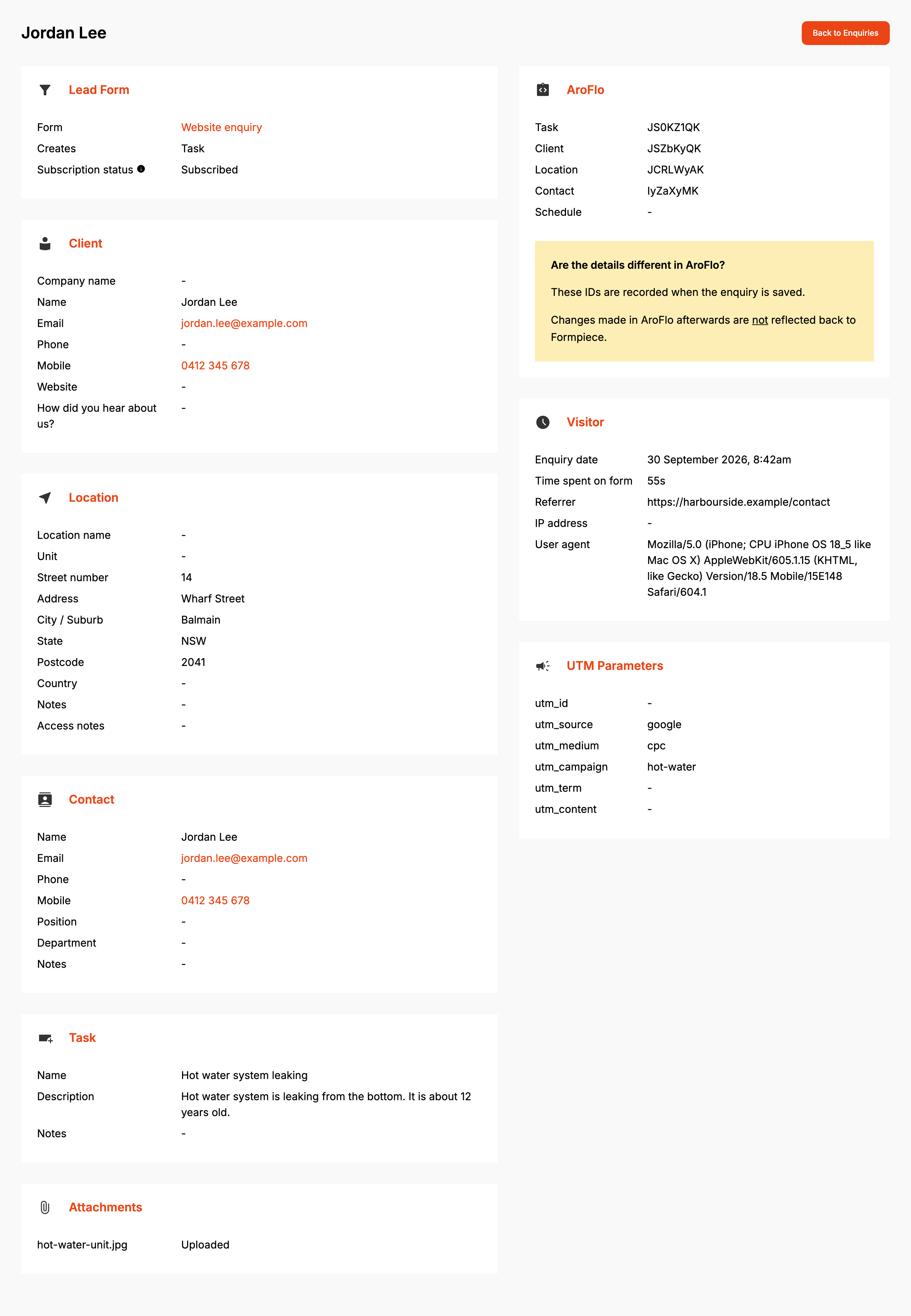
The left side shows what the visitor entered: Client, Location, Contact and the Task or Quote, with any custom fields under the label the form showed. Contact only appears when the visitor filled in contact details. Attachments lists each file as Uploaded or Not uploaded.
The AroFlo panel lists the IDs of the task or quote, client, location, contact and schedule. They are recorded when the enquiry is sent. Changes you make in AroFlo afterwards don't come back to Formpiece.
Visitor has the Enquiry date, Time spent on form, Referrer, IP address and User agent. UTM Parameters shows the utm_ values from the page the form was on.
Send a failed enquiry again
- Open the enquiry. The AroFlo panel says "This enquiry did not reach AroFlo" and why.
- Fix the cause, using What AroFlo said below it.
- Click Send to AroFlo again, then Send again.
The page checks for the result every five seconds for two minutes and updates on its own. After that it says AroFlo has not answered yet. Click Refresh to check again.
A resend picks up where the last attempt stopped. A client, location or contact that the first attempt created is used again. Once the task or quote exists, the enquiry can't be sent again, so AroFlo never gets two for one submission. A successful resend sends the form's notification emails.
When it goes wrong
"What AroFlo said" lists errors on an enquiry that has a task
The task or quote was created but part of the enquiry wasn't. A location, a contact, the task's note or a custom field can each be refused without stopping the task. The list holds the errors from the latest attempt. The line under the heading says whether that was "When the enquiry was submitted" or "During the resend". To see earlier attempts, click Show AroFlo history.
Where AroFlo's message names the task type or priority, a Fix Task Type or Fix Priority button opens the form's Default Fields page. Where it names the business unit, Fix Business Unit opens Properties.
Send to AroFlo again is greyed out
The form has no task type. The panel says "This form has no task type, and AroFlo will not accept the enquiry without one." Click Fix Task Type, choose one on Default Fields, save, and come back.
"No AroFlo credentials are set for this account"
The account has no AroFlo credential selected. Pick one under Settings, then AroFlo Credentials, and send the enquiry again (see AroFlo credentials).
"AroFlo credentials not found"
The credential the account points at was deleted. Pick another one under Settings, then AroFlo Credentials, and send again.
"The AroFlo API token expired on ..."
The date is the Token expires date saved on the credential. Create a new token in AroFlo, paste it into the same credential, and send again.
"Could not create the client in AroFlo" or "Could not create the task in AroFlo"
AroFlo refused the record. What AroFlo said shows AroFlo's message and the fields it named.
Attachments say Not uploaded
Files are uploaded to the task or quote once it exists. If the enquiry hasn't reached AroFlo a few minutes after it was submitted, the upload gives up and the file shows Not uploaded. Sending the enquiry again doesn't upload them. Get the files from the customer and add them in AroFlo.
An enquiry says Waiting for a long time
"The enquiry is saved. It is written to AroFlo straight after the form is submitted, so this is only ever brief." An enquiry that stays like this was never picked up. Open it and click Send to AroFlo again.
"This enquiry has already reached AroFlo."
It was sent while you had the page open. Reload the enquiry to see its task or quote.
Nobody heard about a failed enquiry
Failure emails go to the form's Failed enquiries recipients under Notifications (see Notifications).
FAQ
Does a Podium sync problem show here?
No. Podium errors aren't recorded on the enquiry (see Podium).
What does Subscription status mean?
Whether the account was subscribed when the enquiry was sent to AroFlo. Matching existing locations and writing custom fields depend on it.
