

Create, duplicate, import and archive AroFlo lead forms
Forms under AroFlo Leads lists every AroFlo lead form on the account, with how many enquiries each has taken. Each row's ... menu holds what you can do to that form.
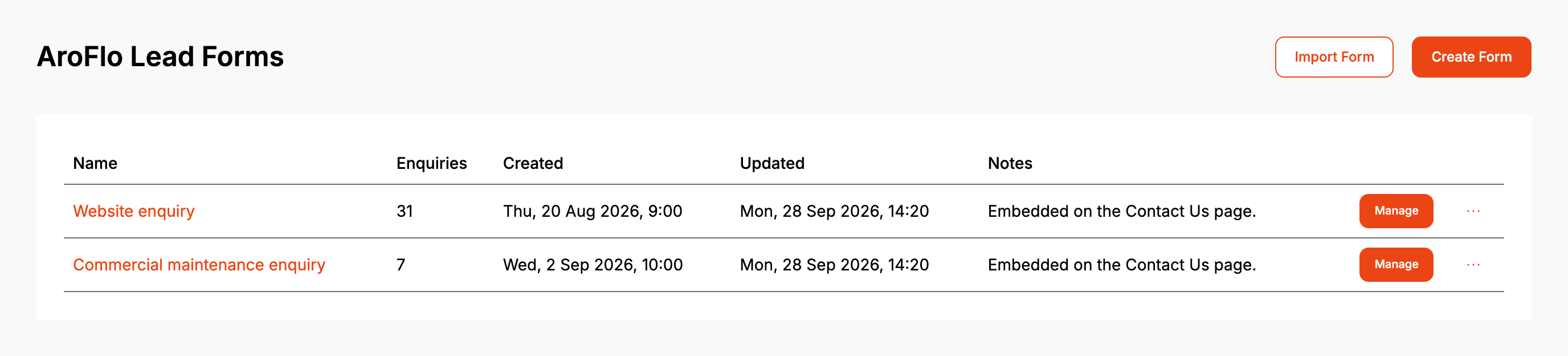
Notes shows the form's internal notes from Properties. Click a form's name or Manage to open it.
Before you start
- The free plan includes one form, archived forms included. Without a subscription Create Form is greyed out once you have one, and Import Form, Duplicate and Export aren't shown.
- Form names have to be unique on the account.
Step by step
Create a form
- Click Create Form.
The form is created as a task form named "AroFlo lead form" and today's date, and opens straight away. Rename it under Properties and change what it creates under Default Fields. To pick the name and task or quote up front, use Getting started on a new account (see Create your first AroFlo lead form).
Duplicate a form
- Click ... on the form's row, then Duplicate.
- Type a Name for the copy and click Duplicate.
The copy has every setting the original has, its notifications included. It has no enquiries.
Export a form
- Click ... on the form's row, then Export.
Your browser downloads a .json file named after the form. The file leaves out what belongs to this account: the AroFlo credential, the captcha, the Google Sheet, the Podium sync and location, and the notification recipients.
Import a form
- Click Import Form and choose a .json file exported from an AroFlo lead form.
- Check the Name for the imported form. If a form here already has the name, it suggests the name with "(imported)" on the end.
- Click Import.
An import is treated as coming from another AroFlo account unless it was exported from this Formpiece account while it used the same AroFlo credential. From another account, the settings that point at AroFlo records are left out: the task type, business unit and priority, the custom fields, and the default assignee, team and status. The dialog lists them. Set them on the form after importing.
Archive or restore a form
- Click ... on the form's row, then Archive.
- Click Archive to confirm.
An archived form comes off your website straight away and takes no new enquiries. Its enquiries stay in Enquiries. Once a form is archived, tabs appear above the list: All, Active and Archived. To bring a form back, click ..., then Unarchive, then Restore. It goes back on the website as it was last saved.
Delete a form
- Click ... on the form's row, then Delete.
- Click Delete to confirm.
Delete only shows for a form that has taken no enquiries, and never for your only form.
When it goes wrong
A new, duplicated or imported form doesn't show on my website
A form is published to your website when it is saved. Creating, duplicating or importing one doesn't publish it. Open the form, check it and save it once.
Create Form is greyed out
The account has no lead form subscription and already has a form. Archiving it doesn't free the place. Hover over the button for the reason, and subscribe to add more forms.
"... already exists"
Another form on the account already has that name. Choose a different name. Create Form names each new form after today's date, so a second click on the same day hits this too. Rename the first form under Properties and try again.
There's no Delete option
The form has taken enquiries, or it is your only form. Archive it instead.
"This form has taken enquiries, so it can only be archived."
An enquiry arrived after the list loaded. Archive the form.
"This file is not an AroFlo lead form export."
The file wasn't exported from an AroFlo lead form. A Simpro form export can't be imported here.
"This file was exported by a newer version of Formpiece and cannot be imported here yet."
The file uses an export format this dashboard doesn't read yet. It can't be imported.
The imported form has no task type or custom fields
It was treated as coming from another AroFlo account, so they were left out. Pick them again on the form. This also happens when the account's AroFlo credential changed after the export.
FAQ
Does an archived form keep its notifications?
Yes. The Notifications tab is hidden while it is archived and comes back when you restore it.
Does duplicating copy the enquiries?
No. Enquiries stay with the form that took them.
