

Collect client details and match repeat clients in AroFlo
Client Fields decides what the form asks about the customer. Formpiece uses the answers to find the client in AroFlo by email address, or create one, before it makes the location, contact and task or quote. On the form these fields sit under "Your Details". Rename it under Styles, then Headings and labels, then Client: Title.
Before you start
- Client custom fields need a Lead form subscription. Without one the Custom fields section says "Custom fields are only available to Lead form subscribers."
- Custom fields are read live from AroFlo through the account's AroFlo credential. Formpiece finds them by reading clients already in AroFlo, so create the field in AroFlo and make sure at least one client exists first.
Step by step
-
Open your form from Forms. If it opens in Form UI, switch to Config. Then open Settings, then Client Fields.
-
First Name, Surname and Company Name are always on and mandatory. They show "Required by AroFlo" and can't be switched off.
-
Switch on each other field the form should ask for.
-
Tick Mandatory field on each one the customer has to fill in. The box only ticks once the field is switched on.
-
Under Custom fields, switch on the client custom fields the form should ask for, and tick Mandatory field where needed. A field AroFlo marks as required starts out ticked.
-
Click Save.
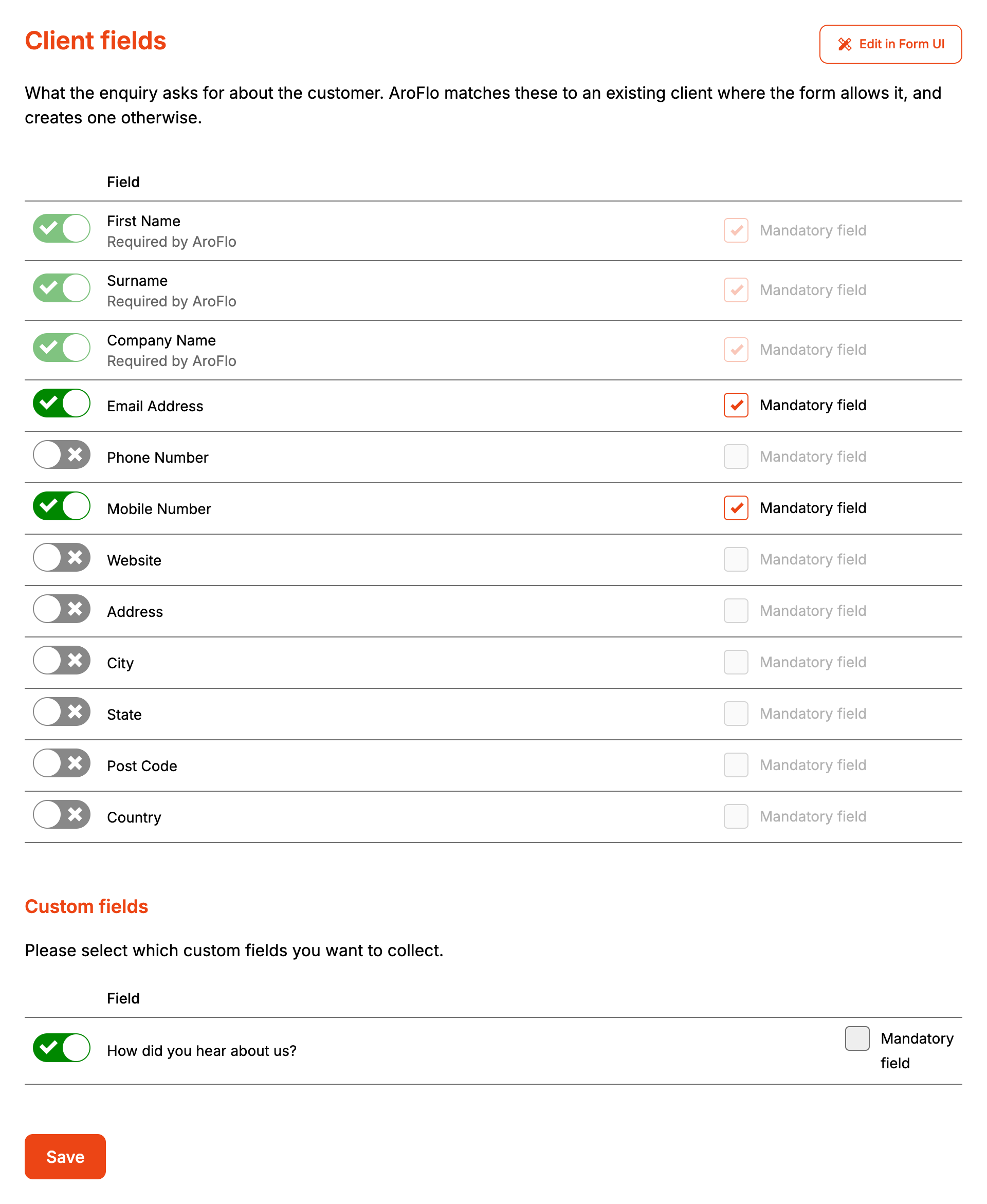
Saving publishes the form, so the next enquiry uses the new fields. Edit in Form UI opens the same fields in the Form UI editor, and the form opens in Form UI from then on.
On the form, Company Name fills itself in with the first name and surname as the customer types them. A customer enquiring for a business types the business name over it, and from then on Formpiece leaves it alone.
Custom fields show on the form as the type AroFlo gives them: a list, a checkbox, a date, a number or a web address. Any other type shows as a text box.
How it maps to AroFlo
Formpiece first works out which client the enquiry belongs to. This happens on every plan and isn't a setting.
- It searches AroFlo's clients for the email address and uses the client whose email matches exactly, ignoring capitals. That client's name, phone and email stay as they are.
- With no email, or no match, it creates a client.
- If AroFlo refuses the new client because one with that name already exists, Formpiece finds the client with exactly that name and uses it.
| On the form | New AroFlo client |
|---|---|
| First Name | Given names |
| Surname | Surname |
| Company Name | Client name |
| Email Address | |
| Phone Number | Phone |
| Mobile Number | Mobile |
| Website | Not written to AroFlo. Shown on the enquiry in Formpiece and in notification emails |
| Address, City, State, Post Code, Country | Not written to AroFlo. Listed in notification emails |
| Custom fields | Client custom fields, with a subscription |
| Business unit from Properties | Business unit |
A new client is a company client when Company Name has a value and an individual client when it's empty. Because the form requires Company Name and fills it from the customer's name, every new client from this form is created as a company client.
With a subscription, custom fields are written to the client on every enquiry, to a matched client as well as a new one.
If AroFlo refuses the client for any other reason, nothing else is created. The enquiry under Enquiries says "This enquiry did not reach AroFlo" with "Could not create the client in AroFlo", and AroFlo's reason is under "What AroFlo said".
When it goes wrong
Repeat customers are duplicated in AroFlo
Formpiece matches on email only. A customer who leaves the email blank or uses another address gets a new client. Make Email Address mandatory so every enquiry has something to match on. If the email search itself fails, Formpiece creates a new client and lists the failed search under "What AroFlo said" on the enquiry.
The enquiry landed on a different client with the same name
AroFlo won't hold two clients with the same name. When a new client's name is already taken, Formpiece files the enquiry against the client with that name. Two customers called Jane Smith with different emails end up on the one client.
A repeat customer's new phone number isn't in AroFlo
A matched client is used as it is. Formpiece doesn't change the name, phone or email AroFlo already holds. Only custom fields are updated.
The website or postal address isn't on the AroFlo client
Formpiece doesn't write Website, Address, City, State, Post Code or Country to the client. The job address belongs on Location Fields.
The form won't get past Your Details
The location, contact and enquiry sections stay locked until every mandatory client field has an answer, including mandatory custom fields.
No custom fields are listed
"No custom fields have been set up in AroFlo for this record, or the AroFlo user has no permission to view them." Formpiece reads custom fields off clients already in AroFlo, so an account with no clients shows none. Check the field exists in AroFlo and the AroFlo user behind the credential can see it.
"Custom fields could not be loaded"
AroFlo's own message shows in bold above the line. Saving from here leaves the custom fields the form already collects as they are, so nothing is lost while AroFlo is unreachable.
A list custom field is missing new options
Formpiece copies a list field's options from AroFlo when the page is saved. Open Client Fields and click Save again to pick up options added since.
Custom fields stopped reaching AroFlo
They need a Lead form subscription. If the subscription ends, Formpiece stops writing them to AroFlo straight away. The form keeps showing them until it is next saved.
