

Ask about the job and put it on the AroFlo task or quote
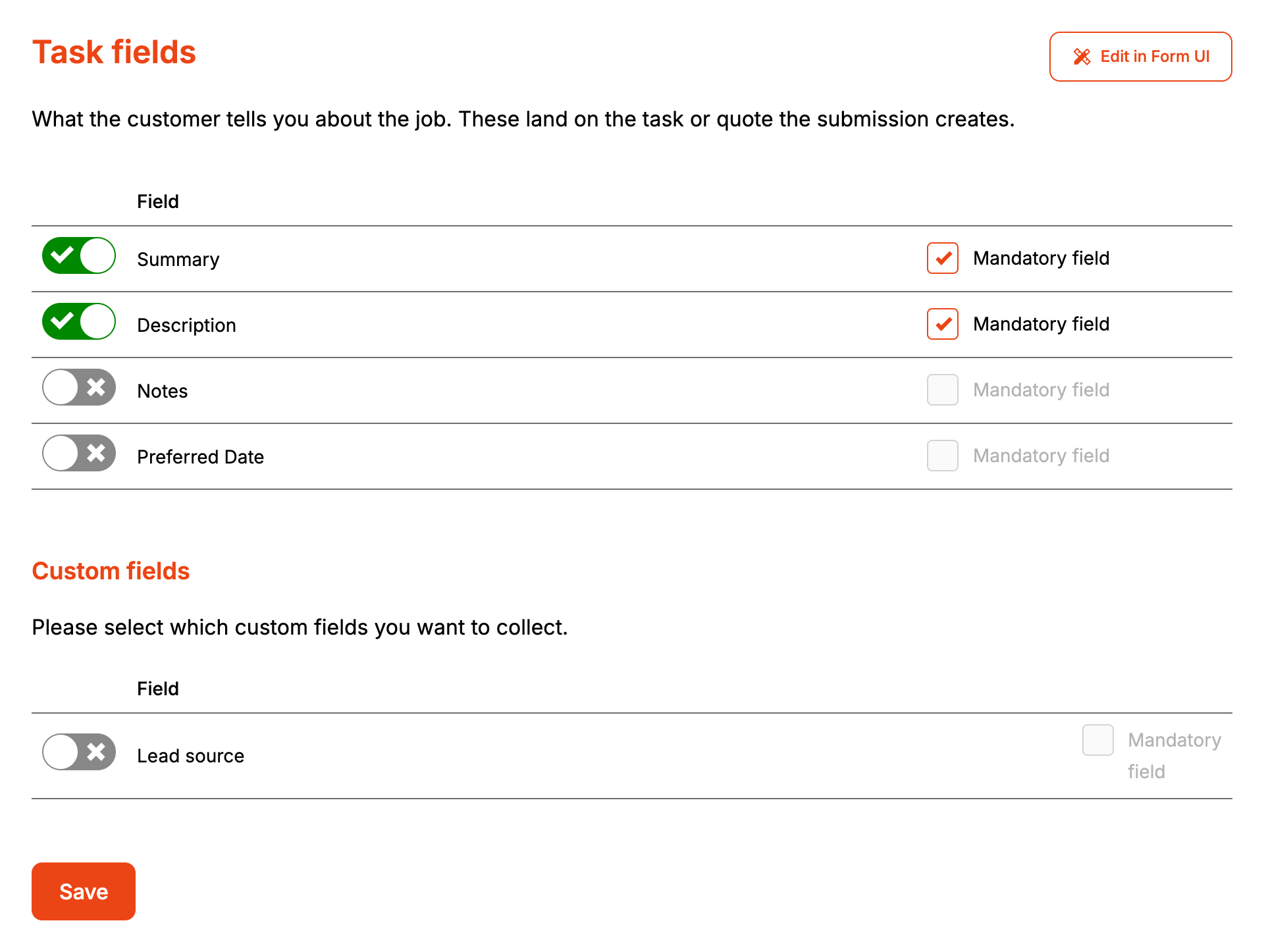
Task Fields decides what the form asks the customer about the job. The answers go on the task or quote the enquiry creates, whichever the form's Default Fields page chooses. On the form these fields sit under "About the Job". Rename it under Styles, then Headings and labels, then Enquiry: Title.
Before you start
- Task custom fields need a Lead form subscription. Without one the Custom fields section says "Custom fields are only available to Lead form subscribers."
- Custom fields are read live from AroFlo through the form's AroFlo credential. Create them in AroFlo first.
Step by step
-
Open your form from Forms. If it opens in Form UI, switch to Config. Then open Settings, then Task Fields.
-
Switch on each field the form should ask for.
-
Tick Mandatory field on each one the customer has to fill in. The box only ticks once the field is switched on.
-
Under Custom fields, switch on the task custom fields the form should ask for, and tick Mandatory field where needed.
-
Click Save.
Saving publishes the form, so the next enquiry uses the new fields.
On the form, Summary is a one line box, Description and Notes are multi-line boxes, and Preferred Date is a date picker. The section stays locked until every mandatory client, location and contact field has an answer.
A custom field AroFlo marks as required starts with Mandatory field ticked. The form shows list and radio fields as a dropdown, checkbox fields as a tick box, and date, number and hyperlink fields as the matching input. Anything else is a text box.
How it maps to AroFlo
| On the form | On a task | On a quote |
|---|---|---|
| Summary | Task name | Quote name |
| No summary given | "Website enquiry" | The Default Quote name from Default Fields |
| Description | Description | Description |
| Notes | A note on the task, added once the task exists | Added to the end of the description, after a blank line |
| Preferred Date | Due date | Due date |
| Custom fields | The task's custom fields | The quote's custom fields |
Preferred Date only sets the due date. It doesn't book or schedule anything. The form doesn't stop a customer picking a date in the past.
Custom field answers are written after the task or quote is created, and only while the account has a subscription. Formpiece checks the subscription when each enquiry arrives.
When it goes wrong
The custom fields list is empty
The page says "No custom fields have been set up in AroFlo for this record, or the AroFlo user has no permission to view them." Formpiece finds task custom fields by reading the ten most recent tasks in AroFlo. A field that only belongs to a task type none of those ten used isn't listed, and an account with no tasks lists nothing. Raise a task of that type in AroFlo, then reopen the page.
Custom fields could not be loaded
Formpiece couldn't reach AroFlo with the form's credential. The page names what AroFlo said and says "Custom fields could not be loaded. Check the credential on the AroFlo settings page." Saving from here keeps the custom fields the form already collects.
A list custom field is missing new options
Formpiece copies a list field's options from AroFlo when you click Save. Options added in AroFlo after that don't reach the form until you open Task Fields and save it again.
The task's notes are missing
On a task, notes are written as a separate note once the task exists. If AroFlo refuses the note, the task is still created. The refusal shows on the enquiry under What AroFlo said, next to "tasks", and goes to anyone set up to receive failed notifications. On a quote, look at the end of the description.
The preferred date isn't on the enquiry page
The task section of the enquiry page shows the summary (as Name), the description and the notes. The preferred date is on the task or quote as its due date, and in the notification email as "Due Date".
The customer can't send the enquiry
Send enquiry stays disabled, with "Please complete the job details." until every mandatory task field has an answer. A single answer over 5,000 characters is refused when it's sent, and the customer sees "Validation error."
FAQ
Can I change the task type or priority from here?
No. Task type and priority are set for the whole form on Default Fields. The customer is never asked for them.
