

Collect the job address and reuse existing AroFlo locations
Location Fields decides what the form asks about where the work is. Formpiece creates an AroFlo location under the client from the answers, or reuses one the client already has at that address. On the form these fields sit under "Location". Rename it under Styles, then Headings and labels, then Location: Title.
Before you start
- A location is only created when the customer fills in Address. Switch it on, and make it mandatory if every task or quote should have a location.
- Address search, the country filter, location matching and the location search options need a Lead form subscription. Without one the page says "Address search and location matching are only available to Lead form subscribers." and those settings are greyed out.
- Matching also needs Match an existing location by address switched on under Default Fields. It is on unless someone turned it off.
- Location custom fields need a subscription too. Formpiece reads them off locations already in AroFlo, so create the field in AroFlo first.
Step by step
-
Open your form from Forms. If it opens in Form UI, switch to Config. Then open Settings, then Location Fields.
-
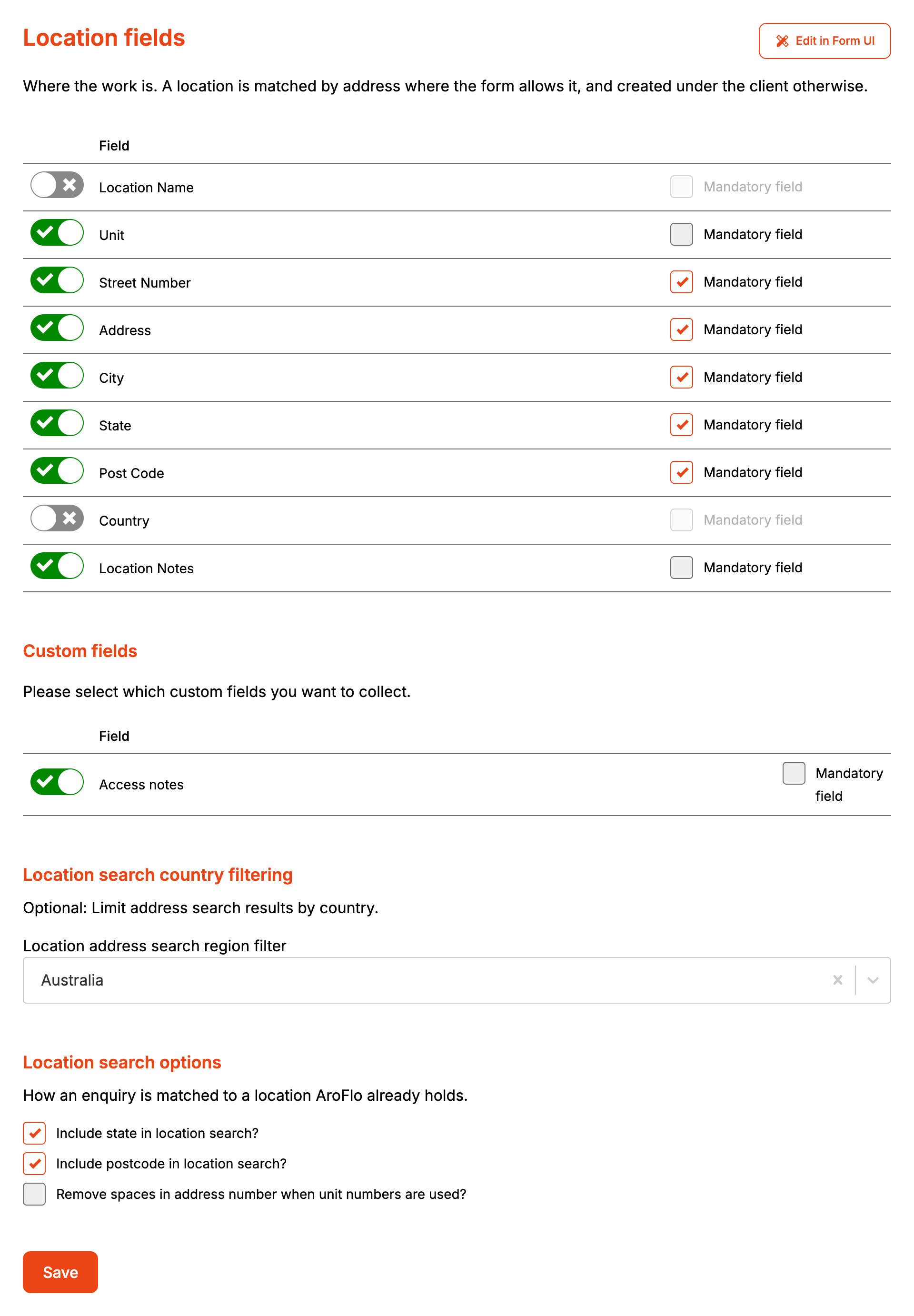
Switch on each field the form should ask for, and tick Mandatory field on the ones the customer has to fill in.
-
Under Custom fields, switch on the location custom fields the form should ask for.
-
In Location address search region filter, pick the country your customers are in.
-
Under Location search options, leave Include state in location search? and Include postcode in location search? ticked unless you have a reason to match on the street alone.
-
Tick Remove spaces in address number when unit numbers are used? if your AroFlo locations are written with no spaces around the slash, as in 5/12.
-
Click Save.
With a subscription and Address switched on, the form shows a "Search address" box above the location fields. Picking a suggestion fills Unit, Street Number, Address, City, State, Post Code and Country, and records where the address is on the map. The region filter keeps suggestions to one country.
The section stays locked on the form until every mandatory client field has an answer. Until then only its heading shows. With Show inactive form sections picked under Styles, then Layout options, it also shows "Please complete the details above." Change that message under Styles, then Headings and labels, then Location: Inactive message.
How it maps to AroFlo
With a subscription and matching switched on, Formpiece searches AroFlo's locations for the street in Address and uses the first one that passes every check:
- it belongs to the same client
- its address contains the street the customer entered
- its state is the same, when Include state in location search? is ticked
- its postcode is the same, when Include postcode in location search? is ticked
A location with no state or postcode recorded in AroFlo passes those two checks. If nothing passes, Formpiece creates a location.
| On the form | New AroFlo location |
|---|---|
| Location Name | Location name. Left blank, the Address is used |
| Unit, Street Number, Address | The first line of the address, such as 5 / 12 Harbour Street |
| City | City |
| State | State |
| Post Code | Postcode |
| Country | Country |
| Location Notes | Notes |
| A picked search result | The location's GPS coordinates |
| Custom fields | Location custom fields, with a subscription |
Remove spaces in address number when unit numbers are used? writes 5/12 Harbour Street in place of 5 / 12 Harbour Street. A unit with no street number is written as Unit 5, Harbour Street. It only changes how a new location is written, and plays no part in matching.
With a subscription, custom fields are written to the location on every enquiry, to a matched location as well as a new one.
If AroFlo refuses the location, the task or quote is still created without one, and AroFlo's reason shows under "What AroFlo said" on the enquiry.
When it goes wrong
The task has no location
Either the customer left Address blank or AroFlo refused the location. Open the enquiry from Enquiries and check "What AroFlo said".
A new location is created for an address the client already has
- The account has no Lead form subscription, or Match an existing location by address is off under Default Fields.
- The state is written differently. Address search fills State with the full name, such as New South Wales, and a location held as NSW doesn't match. Untick Include state in location search? if your locations use abbreviations.
- The postcode differs from the one AroFlo holds.
- The street is written differently. "Harbour Street" isn't found in a location saved as "Harbour St".
- The location is under a different client. Only the client the enquiry matched is searched.
The enquiry went to the wrong location on the same street
Matching compares the street in Address. The street number and unit aren't part of it, so a client with two locations on one street can have the enquiry filed against either. If your clients often have several locations on one street, switch Match an existing location by address off.
The address search box doesn't show on the form
It needs a Lead form subscription and Address switched on.
Address suggestions come from the wrong country
Pick a country in Location address search region filter and click Save.
No custom fields are listed
"No custom fields have been set up in AroFlo for this record, or the AroFlo user has no permission to view them." Formpiece reads custom fields off locations already in AroFlo, so an account with no locations shows none.
