

Check an enquiry and what reached Simpro
Every submission is saved in Formpiece as an enquiry before it is sent to Simpro, so an enquiry that never became a lead is still here in full. Enquiries lists them for the whole account, and a form's Enquiries tab lists that form's, newest first and 50 at a time.
Step by step
-
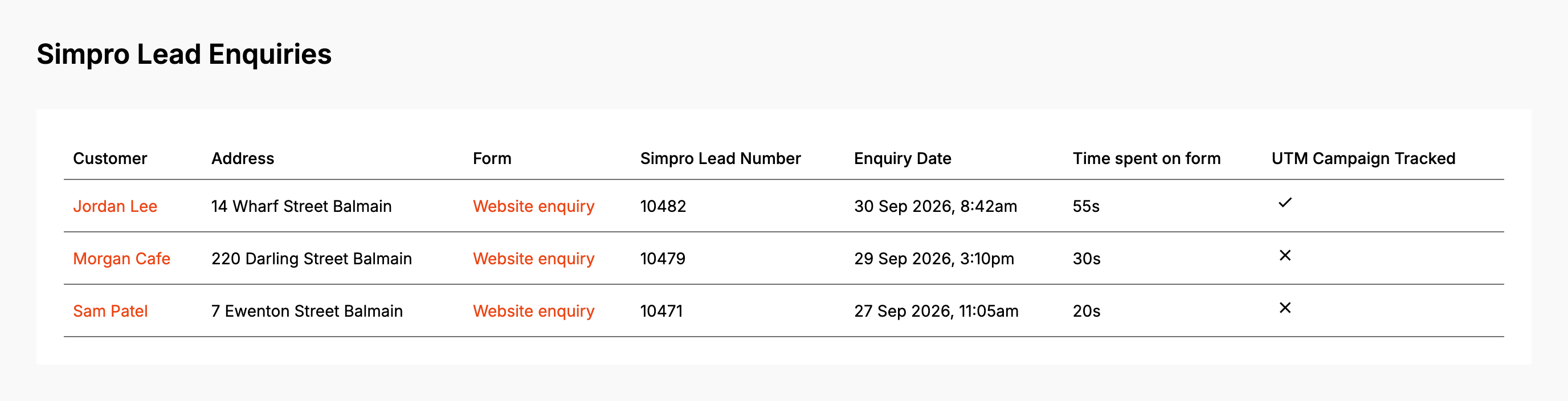
Click Enquiries in the lead form menu. Load more enquiries at the bottom fetches the next 50.
-
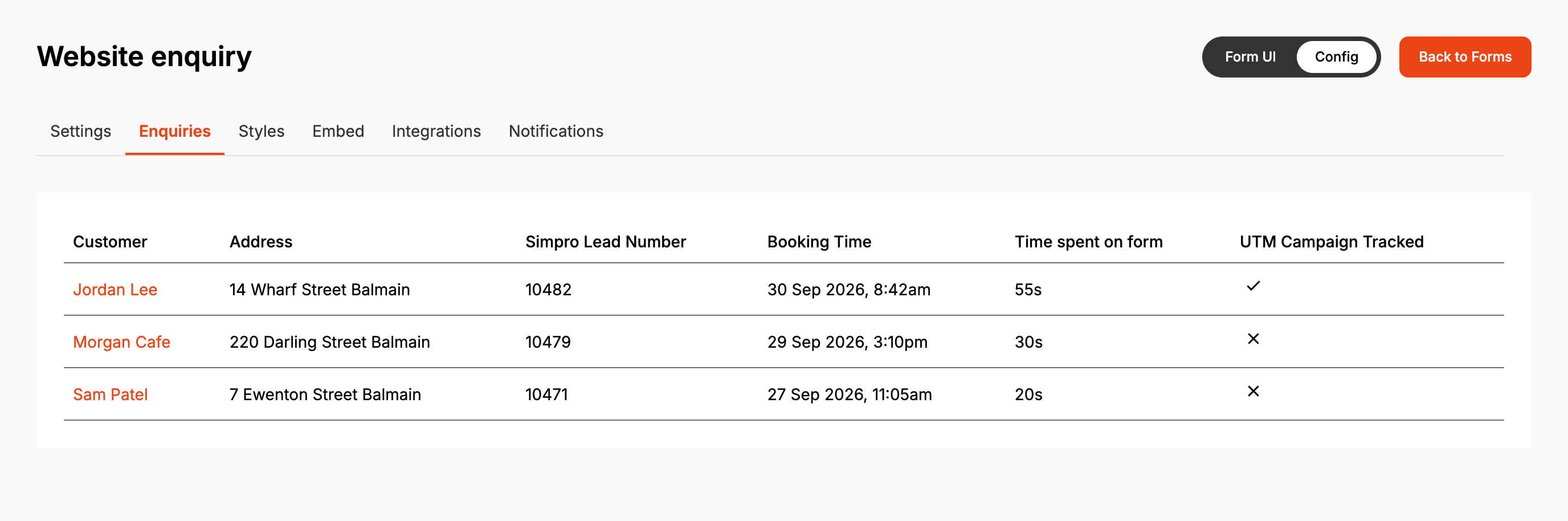
For one form, open it from Forms and click its Enquiries tab. The tab appears once the form is saved with a company.
-
Click the customer's name to open the enquiry. Back to Enquiries returns to the account's list.
In both lists, Customer is the company name when the visitor gave one, otherwise their name.
Simpro Lead Number is the lead's ID in Simpro, or Not created when no lead was made. The
form tab's Booking Time is when the enquiry was submitted, the same as Enquiry Date on the
account's list. Time spent on form runs from the form loading to the visitor first typing a
name, company, phone or email, so it leaves out the time spent on the rest of the form. UTM
Campaign Tracked is ticked when the page address carried any utm_ value.
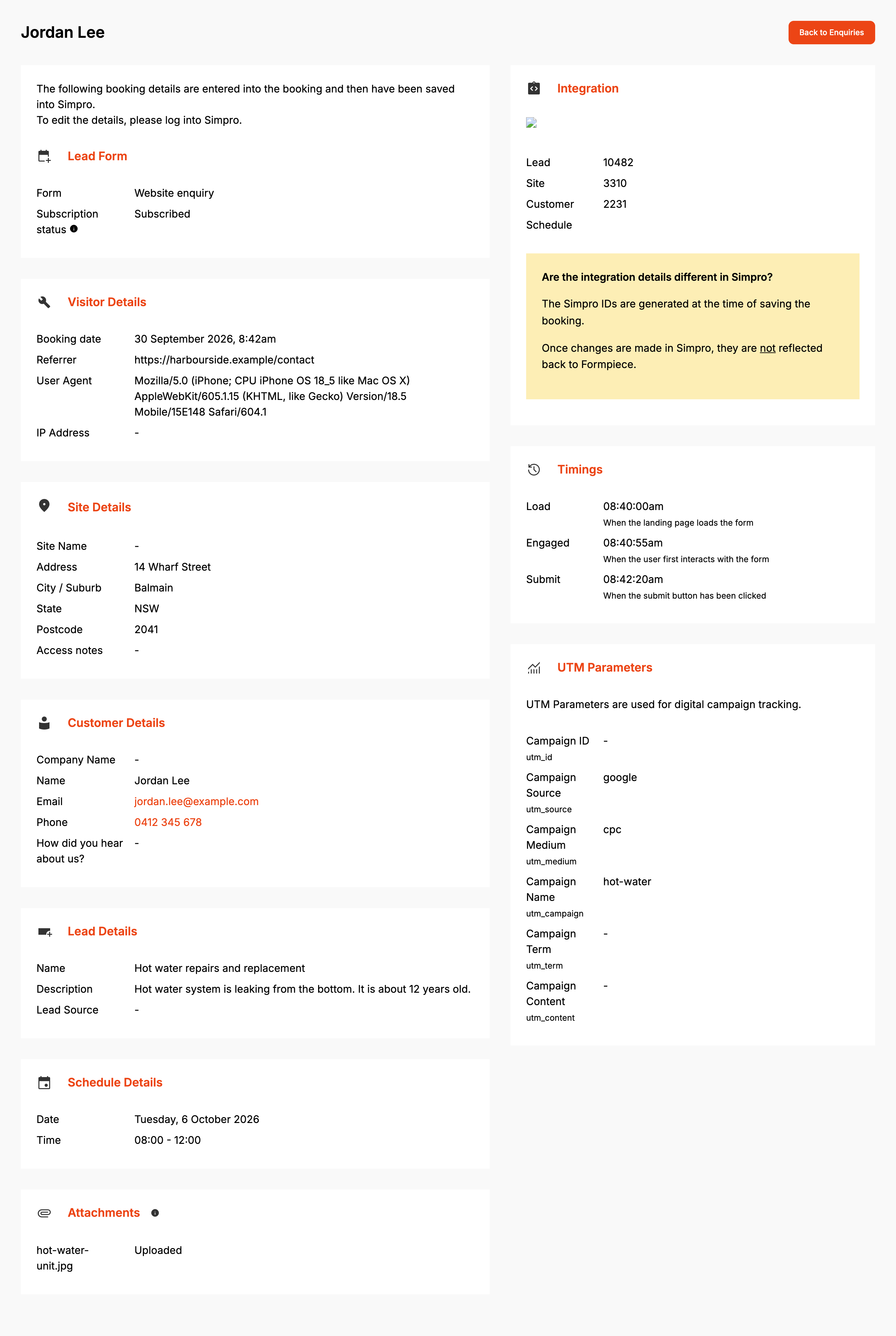
The enquiry page is laid out in sections:
| Section | What it shows |
|---|---|
| Lead Form | The form, and Subscription status: whether the account was subscribed when the enquiry was handled |
| Visitor Details | Booking date (when the enquiry was submitted), Referrer (the address of the page the form was on), User Agent (the visitor's browser) and IP Address |
| Site Details, Customer Details, Lead Details | What the visitor entered, plus each custom field on the form. A dash means it was left empty or not asked |
| Schedule Details | The date and time picked for a visit |
| Attachments | Each file, marked Uploaded once Formpiece holds a Simpro attachment ID for it, otherwise Not uploaded |
| Integration | The Simpro Lead, Site, Customer and Schedule IDs |
| Timings | Load, Engaged and Submit times |
| UTM Parameters | The six utm_ values from the page address |
Timings and UTM values are recorded on every enquiry. Time spent on form, UTM Campaign Tracked, Timings and UTM Parameters only show while the account has a Lead form subscription, older enquiries included. Without one they read "Subscription required".
How it maps to Simpro
| Integration | In Simpro |
|---|---|
| Lead | The lead made for the enquiry, in the form's company, with the cost centre the visitor picked or the form's default |
| Customer | A company customer when the visitor gave a company name, otherwise an individual. On a subscribed account an existing customer with the same email is used instead |
| Site | On a subscribed account an existing site at the same address is used. Otherwise a new site, named after the site name or the address |
| Schedule | The visit booked on the lead. Subscribed accounts only, and only when the visitor picked a time |
The IDs are written when the enquiry is sent. Changes made in Simpro afterwards don't come back to Formpiece.
When it goes wrong
"This enquiry did not reach Simpro"
No lead was made. The box lists each reason, with the record being created in bold (customer, site, lead, Formpiece and so on) and the message after it. Simpro's messages come through as Simpro sent them. Formpiece's own are:
| Message | What to do |
|---|---|
| No Simpro credentials are set for lead forms. | Pick a credential on Simpro Credentials |
| The Simpro credentials set for lead forms could not be found. | The credential was deleted. Pick another on Simpro Credentials |
| The Simpro credentials set for lead forms are incomplete. | The credential has no Build URL or token. Fix it on Integration Credentials |
| The Simpro connection could not be refreshed. Reconnect Simpro in the lead form settings. | The Simpro login behind the credential has lapsed. Open the credential on Integration Credentials and click Log in to Simpro to refresh tokens. The lead form settings can't reconnect it |
| The Simpro connection has expired and has no refresh token. Reconnect Simpro in the lead form settings. | The same as above |
| The form has no Simpro company selected. | Set the Company on Properties |
| Could not create the customer in Simpro. (or site, or lead) | Read Simpro's message on the line above it |
When the lead failed, Integration can still show a Customer and Site. Those were created in Simpro before the lead was refused. Formpiece doesn't resend a failed enquiry, so create the lead in Simpro from the details on the page.
"No reason was recorded against the enquiry"
The enquiry is still being sent. It shows on an enquiry opened in the seconds after it arrives. Reload the page.
The lead is in Simpro but its status, a custom field or the visit is missing
Simpro refused that part once the lead was made. Formpiece records the reason on the enquiry, but the enquiry page only lists reasons when no lead was made. The failure email to the form's Failed notifications recipients lists every one. An empty Schedule under Integration means no visit was booked.
FAQ
Can I search or export enquiries?
Not from the dashboard. Both lists show 50 at a time, newest first.
