

Collect the site address and site custom fields on a lead form
Site Fields decides what the form asks about the place the work is at. Every lead is raised against a Simpro site, so Formpiece uses an existing site with the same address or creates a new one. On the form these fields sit under the "Address" heading, which opens once the contact details are complete. Rename it under Styles, then Headings and labels, then Site Details: Title.
Before you start
- The form needs a Simpro company on its Properties page. Until it has one, Site Fields is missing from the form's menu.
- Site custom fields need a Lead form subscription. Without one the Custom fields section is greyed out and says "Site custom fields are only available to Lead form subscribers." The standard fields work on every plan.
- Site custom fields are read live from the form's Simpro company. Create them in Simpro first.
Step by step
- Open your form from Forms. If it opens in Form UI, switch to Config. Then open Settings, then Site Fields.
- Under Standard fields, switch on each field the form should ask for.
- Tick Mandatory field on each one the customer has to fill in. The box only ticks once the field is switched on.
- Under Custom fields, switch on the site custom fields the form should ask for, and tick Mandatory field where needed.
- Click Save.
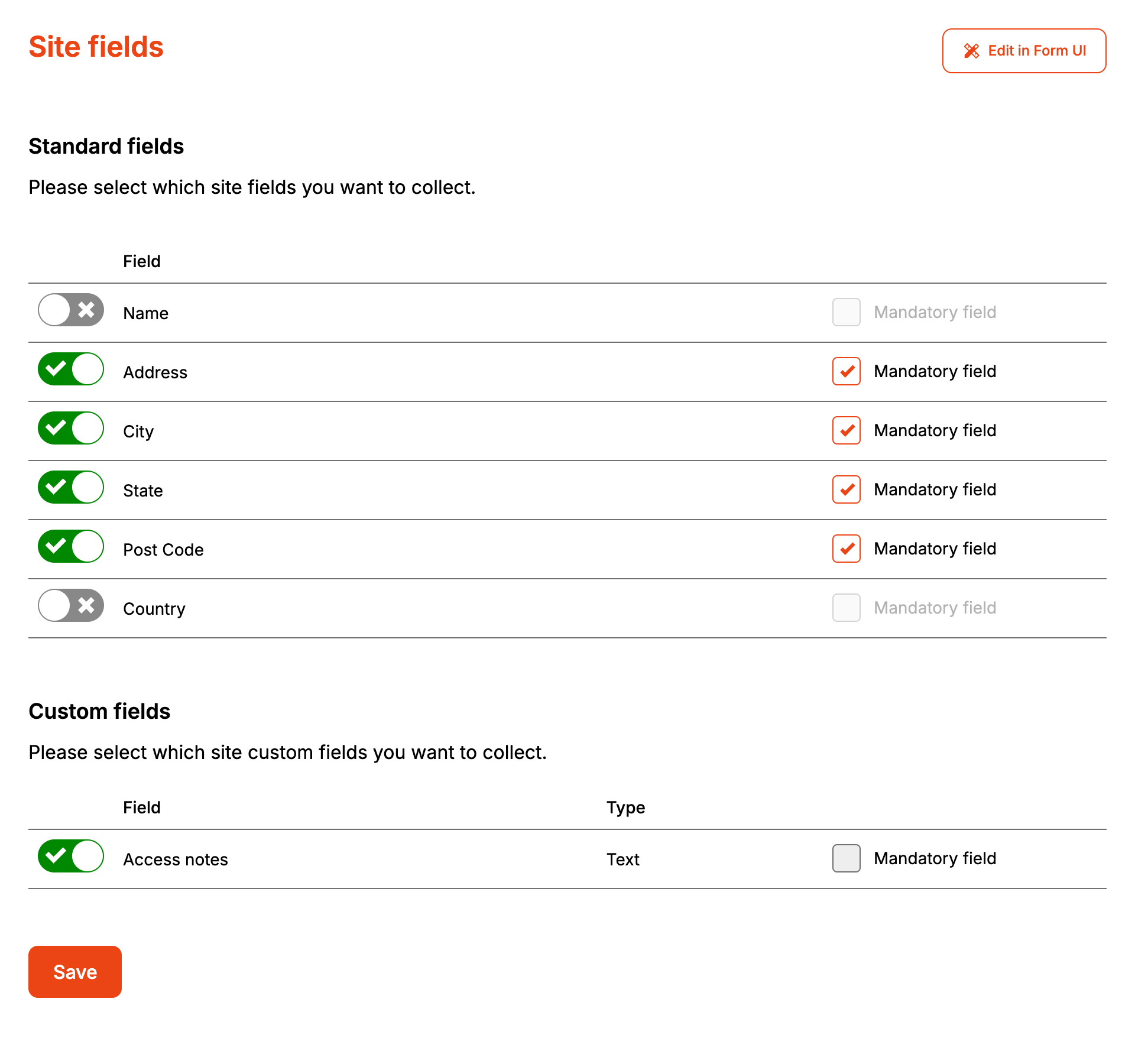
Saving publishes the form, so the next enquiry uses the new fields.
Address puts three boxes on the form: "Unit Number", "Street Number" and "Address". With a subscription it also adds a "Search address" box. Picking a Google result there fills in the address boxes.
The form shows Text, List, Date, Numeric and Hyperlink custom fields. A Numeric field takes digits only. A custom field of any other type is left off the form.
How it maps to Simpro
| On the form | On the Simpro site |
|---|---|
| Name | Site name |
| Unit Number, Street Number, Address | The street line of the address, written as "U3 12 Smith St" |
| City | City |
| State | State |
| Post code | Postal code |
| Country | Nothing. The form doesn't show this field |
| Custom fields | The same site custom fields, written after the site is found or created |
Leave Name off, or let the customer leave it blank, and the site is named after its address, for example "12 Smith St, Sydney, NSW, 2000". With no address either, it is called "(new formpiece site)".
With a subscription, Formpiece first looks in the company for a site with the same street, city, state and postcode, using whichever of those the customer filled in. It takes the first match and leaves its name and address as they are. The customer's site custom field answers are still written to it. The site name isn't part of the search. Without a subscription, every enquiry creates a new site.
If Simpro refuses to create the site, no lead is created, though the customer is already in Simpro by then. Simpro's reason shows on the enquiry under Enquiries. A refused site custom field doesn't stop the lead, and isn't listed on the enquiry page.
When it goes wrong
Country doesn't appear on the form
The form has no country box, so switching on Country changes nothing. Formpiece doesn't write a country to the Simpro site either.
Customers without a street number can't send the form
Marking Address as mandatory makes "Street Number" required as well as the street. Leave Address optional if you take enquiries for places that have no street number.
A repeat customer gets a second site
Formpiece only reuses a site when Simpro finds one with the same address details, and it only looks with a subscription. An address written differently from the one in Simpro can miss. The "Search address" box fills "State" with the full name, for example New South Wales, so a site saved in Simpro with NSW may not match.
Leads land on another customer's site
With a subscription, the first Simpro site with a matching address is used, whoever it belongs to. Two customers at one address share a site.
A list custom field is missing new options
Formpiece copies a list field's options, and the field's name, from Simpro when you switch the field on or change Mandatory field. Options added in Simpro after that don't reach the form. Switch the field off and on again, then click Save.
Site custom fields are greyed out
They need a Lead form subscription. If the subscription ends, the form keeps showing them until it is next saved, but Formpiece stops writing the answers to Simpro straight away.
